Blog ·
Call tracking for small business: count the calls, not the clicks.
You have a Google listing, a website, maybe some ads. The phone rings. Which one made it ring? Most owners guess, and the guess usually decides where next month’s money goes. Call tracking replaces the guess with a count.
Here is how it works, how to set it up without messing up your Google listing, what Google already counts for free, and the four numbers worth reading once a month.
What call tracking is
You get a separate phone number for each place people find you. The Google listing gets one, the website gets one, the ads get one. Every number forwards to the phone you already answer. The caller notices nothing.
The tracking system logs which number was called, when, how long the call lasted, and whether anyone picked up. Some tools can record calls too. That is the whole idea. You are not buying leads. You are counting the ones you already get.
What Google already counts for you
Before you pay for anything, know what you get for free, and what it leaves out.
- Your Business Profile shows “Calls.” Google’s performance help page defines it as the number of times a customer clicked the call button on your profile. A tap is not a call. It does not tell you whether the call connected, whether anyone answered, or whether it was a customer or a sales pitch.
- Google Ads has call reporting. Google’s call reporting page lists Canada among the countries where Google forwarding numbers work. With it on, Google puts its own number on your call ads and call assets and logs call length, start time, and whether the call connected. You can count calls over a length you choose as conversions.
Neither one counts the person who read your website and then dialled the number on it. Neither one shows you the calls you missed. That gap is what a tracking number fills.
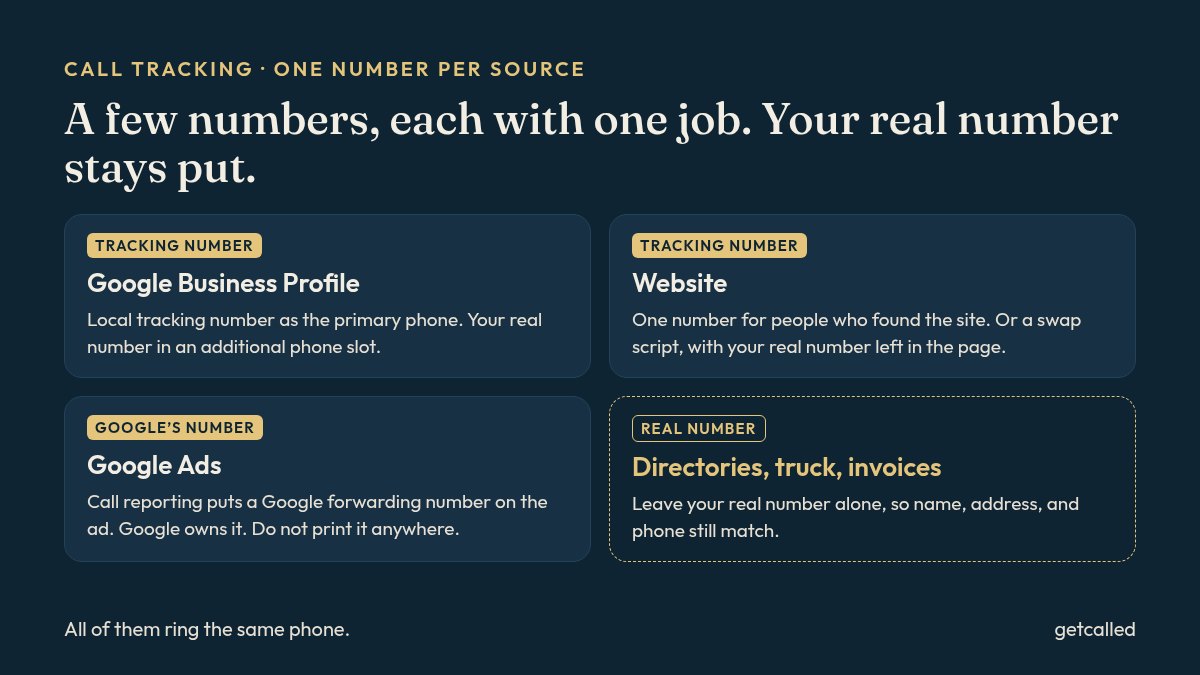
One number per source, not one per everything
Keep it small. For most trades and service businesses, three sources cover nearly every call:
- The Google Business Profile. For a local service business, this is usually the biggest one.
- The website. People who found your service page and called from it.
- Google Ads, if you run them. Google can handle this one itself (more below).
A fourth number for a flyer drop or a radio spot is fine, if you will actually look at it. Twelve numbers you never check is just a bigger phone bill.
What does not get a tracking number: your directories, your truck, your invoices, your business cards. Those keep your real number. That is what keeps your name, address, and phone matching everywhere, which matters for the map. More on that in NAP consistency.
Setting up the Google listing without breaking it
This is where people get nervous, and fairly. Your listing is the result most customers call from. Google’s guidelines for representing your business do not ban tracking numbers, but they set rules for the phone number on the profile:
- It has to connect to your business.
- It has to be under your direct control.
- Use a local number instead of a central call centre number when you can.
- No premium-rate numbers, whatever they cost the caller.
- No numbers that send people to some other business.
So pick a tracking number with your local area code, forwarding straight to your own phone, in an account you own. Then set it up like this:
- Go to your Business Profile and select Edit profile, then Contact.
- Put the tracking number in Phone number, the primary slot.
- Select Add phone number and enter your real number. Google’s edit profile help says you can add up to two more numbers, mobile or landline.
- Select Save.
Your real number stays on the profile, so it still lines up with your directories and your site. Do this once and leave it. Changing the main number back and forth is how listings end up asking to be re-verified. If yours is not verified yet, do that first: how to verify a Google Business Profile.
On your website: one number, or a swap
Two ways, both fine:
- One website number. The site shows a tracking number instead of your real one. Simple. Keep your real number in the footer or on the contact page, so the site still matches your listing.
- A number swap. Most tracking tools offer a small script that shows visitors a tracking number, sometimes a different one for people who came from an ad. The real number stays in the page itself. More detail, a bit more to set up.
Either way, the number has to be tappable on a phone. Most people calling a plumber are holding one.
On Google Ads: let Google count, or use your own
You have to pick one. Google’s call reporting puts a Google forwarding number on your ads. Google is clear that those numbers are its property, can change or be reassigned, and cannot be used outside call reporting. So never print one on a truck or a flyer.
If you would rather show your own tracking number on the ads, Google says to turn call reporting off in Account settings. Then Google Ads stops counting those calls and your tracking tool does it instead. For most small accounts, leaving call reporting on is the simpler choice. Pair it with sensible location targeting, so the calls come from where you actually work.
Own the number
Same rule as your domain and your Google listing. Open the tracking account in the business’s name, or make sure the agency’s contract says the numbers are yours. Before you sign up anywhere, ask one question: if I leave, can I take the number with me?
Here is why it matters. Once a tracking number is the main number on your Google listing, customers save it and call it again. If someone else owns it and you part ways, those calls go wherever that number goes next.
Recording calls in Canada
Recording is optional. It is handy for training whoever answers the phone, or for settling “I never said that.” If you record, Canadian privacy rules expect you to tell callers the call is being recorded and why, before the conversation starts. Most tools play a short message for you. If you do not need recordings, leave it off and just track the number, the time, and the length.
The four numbers worth reading
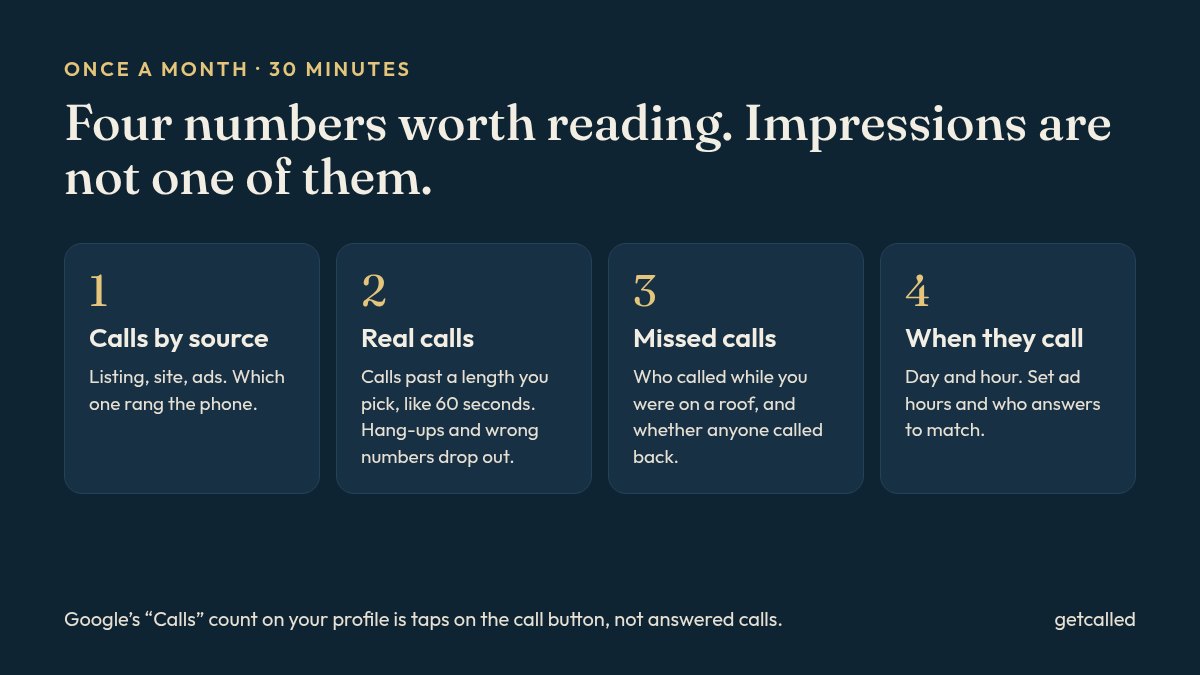
Once a month, half an hour:
- Calls by source. Listing, website, ads. Which one actually rang the phone.
- Real calls. Calls longer than a length you pick, say 60 seconds. That drops hang-ups, wrong numbers, and most robocalls. Google Ads lets you set the same kind of minimum for counting a call as a conversion.
- Missed calls. This one stings. Every owner thinks they answer everything. The log shows the calls that came in while you were on a roof, and whether anyone called back.
- When people call. Day and hour. Set your ad schedule, your listing hours, and who answers to match.
Change one thing based on what you see, then look again next month. Do not change five things at once, or you will not know which one worked.
What it costs, roughly
Tracking tools usually charge a monthly fee per number plus call minutes, and prices change, so check the provider’s own page in Canadian dollars before you commit. Three or four local numbers is a small line item next to an ad budget. The bigger cost is not reading it.
What this will not do
Call tracking does not make the phone ring more. It tells you where the calls you already get come from, and which ones you are missing. If the counts are low everywhere, the fix is upstream: what to fix first, the Google listing, and a steady trickle of reviews.
In Local Presence, counting the calls is part of the job: a tracked phone number or form, and a 30-minute call once a month on how many calls and forms came in, what we changed, and what we will do next. We do not report impressions. The listing and the numbers stay in your name. It is $1,400 a month for six months, or $1,200 a month for twelve, with a $150 setup. Prices in Canadian dollars, before HST. Not sure where your calls are coming from? Tell us where you are or write to hello@getcalled.ca.
Questions
A separate phone number for each place people find you, like your Google listing, your website, and your ads. Every number rings the phone you already answer, and the system logs which number was called, when, and for how long. So you can see which source made the phone ring.
Google’s guidelines do not ban tracking numbers. They ask that the number connect to your business, be under your direct control, and not be a premium number, and they prefer a local number. Put the local tracking number in the primary slot, keep your real number as an additional phone, and leave your real number on your directories so your name, address, and phone still match.
Partly. Your Business Profile performance shows Calls, but Google defines that as taps on the call button, not answered calls. Google Ads call reporting is available in Canada and counts calls from your ads through a Google forwarding number. Neither one counts calls from your website or tells you which calls you missed.
Only if the account and the number are in your name, or the provider lets you move the number out. Ask before you sign up. If the agency owns the number and you leave, the calls from your Google listing go wherever that number goes next.
In Canada, privacy rules expect you to tell callers that a call is being recorded and why, before the conversation starts. Most tracking tools play a short message for this. If you do not need recordings, leave recording off and track only the number, the time, and the length of each call.